AI Course Creation
Describe what you want to learn and let AI plan, title, and structure your entire course automatically.
Instead of building a course topic by topic, describe the subject in plain language and the AI plans the whole curriculum for you — generating a course title and a structured topic list in seconds.
What AI Course Creation Does
When you tap "Create with AI", you get:
- A generated course title — The AI names the course to match your intent.
- A structured topic list — Typically 5–10 topics, ordered from foundational to advanced.
- Subtopics on demand — When you open any topic, the AI generates its subtopics at that moment.
How to Create an AI Course
1
Tap "Create with AI"
From My Courses, tap the + button and select "Create with AI".
2
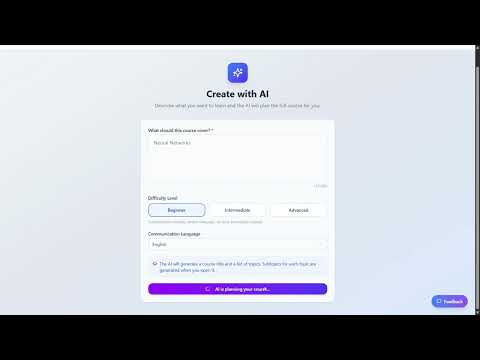
Describe the Course
Write what the course should cover. Be specific — include the subject, target outcome, and any key areas you want included. The AI uses your words to plan the curriculum.
3
Choose Difficulty & Language
Select Beginner, Intermediate, or Advanced. Choose the language the AI will use to generate and explain the content.
4
Tap "Generate Course"
The AI builds your full course structure. You land directly on the Course Details screen to review all generated topics.
✨
Create with AI
Describe what you want to learn
What should this course cover? *
I want to learn Python for data analysis, covering pandas, matplotlib, and basic machine learning with scikit-learn.
87/5000
Difficulty Level
Beginner
Intermediate
Advanced
✨ Generate Course
Enter a description, pick a difficulty, and tap Generate — the AI does the rest
Difficulty Levels
- Beginner — Foundational concepts in plain language. No prior knowledge needed.
- Intermediate — Builds on basic knowledge. Introduces more complex ideas and applications.
- Advanced — Deep coverage of nuanced techniques, edge cases, and professional-level material.
After Generation
Once your course is generated, you can:
- Reorder topics — Drag to rearrange, or use AI Suggest Order for an optimised sequence.
- Open a topic — The AI generates subtopics the first time you tap a topic.
- Add or remove topics — Manually add more topics or remove any you do not need.
The more specific your description, the better the AI structures the course. Instead of "I want to learn Python", try "Python for data analysis covering pandas, matplotlib, and basic machine learning with scikit-learn". Mention your goal, audience, and any specific areas to include.
Credit Cost
- Course generation — Credits are consumed once when the AI creates the course structure.
- Subtopics — When you first open a topic, generating its subtopics costs the same as creating a standard topic.
- Editing — Reordering, renaming, and deleting topics is always free.
Watch Tutorial